



Our last post on the new EU cookie directive resulted in a lot of questions, so we decided to put together a little Cookie Policy widget you can add to your websites.
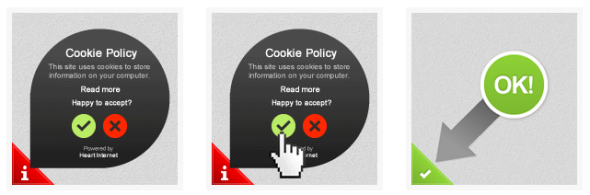
Our EU cookie policy widget is completely free, easy to use, and works on any website regardless of where it’s hosted. Our thinking behind it was that it should be noticeable but not intrusive for your visitors, and it has the added bonus of being mobile friendly as well. Find out more and add it to your website by copying the code on our EU cookie law page. [Please note: This widget is no longer available]
If you’re not sure what the EU cookie law is or why you need to comply, you can find out more about it here. Please be aware that the deadline for your website to comply is 26th May 2012.


Thanks so much for this, brilliant service as usual.
What if the visitor has javascript disabled? Presumably they still need to be able to opt-out of cookies?
Hi Jon, it won’t work if the visitor has JavaScript disabled unfortunately (there’s no practical implementation), but that only affects a tiny percentage of users statistically.
I assume that I would also need to wrap the Google Analytics code within the if statement you provided too?
if(HI.optInCookies.allowed()) {
// Google analytics here
}
Hi George,
Yes, that’s right.
Thanks Suzanne! 🙂
Great to have, but can a white-label version be made available via the Reseller Control Panel?
Hi Andrew,
We don’t have any plans for that at the moment I’m afraid 🙂
Well done for this – it’s really good of you guys to have worked so hard on this.
Much like many of the other crazy laws that our beloved government have cooked up lately, I’m going to be ignoring it though.
They can jump for their 1/2million quid – I don’t have it 😉
Hi,
Thanks for this – I’ve put the utility onto one of my websites but the text is appearing left-aligned, not centred, so is not properly visible.
Any suggestions?The site is visible at https://www.corringhamevangelical.co.uk/
Cheers,
Dave
Good concept.
But just noticed that once you accept the cookies you have to perform a refresh of the page manually before the cookies you need are set the script only sets the cookie eu-opt-in with the value if 1. Also not too sure about the “No I don’t accept”taking you off site, maybe consider revising this just to close the “Cookie policy” window and allow the corner tab to be clickable to allow the user to change their minds later.
Good concept tho and an ok-ish solution for small sites that need to be compliant immediately.
I agree with Andrew a white lable version is needed or the ability to remove the powered by text for resellers
Plus what about Joomla driven sites ?
Cheers
Thats brilliant – was just looking at other types of these popups today. Yours is nice & simple
Well done!
🙂
Dave,
We have have center aligned thetag using !important in the CSS. I’ve had a look at your website and thats fixed it for you.
Cheers
Matt
Wayne,
if you want an automatic reload you can add this:
<script type=’text/javascript’>
HI.optInCookies.onAgree = function() {location.href = location.href}; </script>
Cheers
Matt
Thanks Laura
Is it fair to assume that since you’re not using the code on the Heart site and your privacy policy was last updated on 28th January 2009 that you also think this law is a non starter? 🙂
On a serious note, thanks for the code – it’s relatively unobtrusive and easy to use.
Thanks.
What a great idea! It is such a silly law but this is a great way around it. Very quick and easy to implement. You should make a white label version, I reckon people would pay for that!
Colin,
It should be fine with Joomla, please let us know if that isn’t the case.
Matt
Thanks!
Phil,
Thanks for the kind words. We’ll stick with giving it away free for now though 🙂
Cheers,
Matt
Thanks very much – that’s much better!
Hi,
Not sure if its me or if this happens with everyone else. This seems to work for the first page you land on. Whatever the page is. But once you click to another page on the site. The cookie is saved to my device. I have tested it on both my iphone and new ipad. Is this a bug or is that mean to be how it works? I thought the idea of it was to stop the cookie downloading to devices until you click to opt in? Is this because the visitor has had their initial chance to see the message and accept or decline and if they decide to enter the website further they have as good as accepted the terms of the website?
Thanks
John
Another vote for a White Label version for resellers!
Great little widget, really appreciate the development.
Only issue I’m having with using it on WordPress, and having put the code into the footer.php file as suggested is that it is reloading the widget on each page on my site. Any suggestions?
Thanks
Thanks for the code – a fantastic help! Are we permitted to download the JavaScript and CSS and modify it and customise it as we wish?
Cheers,
Matt
Hi John, yes, it’s designed to be easy for your visitor to see and respond to. If they choose to ignore the message altogether then that’s their decision 🙂
Hi Laura,
Not sure what you mean – it’s designed to display the widget on each page of your site because your visitors could land on any page. Or is it the reloading itself that’s the issue?
Jenni
Hi Matt,
Our pleasure 🙂 Afraid not at this time, thanks for the question though!
Hiya, I’m afraid it’s still displaying strangely for me.The decline and agree icons aren’t showing up in my version of IE9.Not sure what may be the problem
Hi Jason,
How does it look now? 🙂
Wow, it’s working.That is awesome.What was the change?
Hi Jason,
Our devs made a quick syntax change and an emulation for the white-space rule, both of which were previously causing some odd things to happen in certain versions of IE. Thanks for letting us know 🙂
Really impressed with how fast you all respond to things.Thanks again for such a great little ‘fix’ to the whole cookie problem.
Thanks Jason!
I notice you are not implementing this cookie widget or similar on http://www.heartinternet.uk
Or are you simply waiting until the 26th?
Hi Gavin, we’re waiting at the moment. We have quite a few different aspects and implementations to consider because of the way we operate 🙂
Hi Jenni,
Yes, sorry. If a visitor accepts it on any page other than the home page, it reloads it on every subsequent page visited until you visit the home page and accept it there, at which point to accepts it for the whole domain.
Any way around that?
Thanks
Laura
A lot of businesses I’ve spoken to about this simply don’t care and have stuck two fingers up at the EU and it’s beauracracy
Hi Laura,
I’ve just had one of our developers take a look and he’s made an adjustment to the code which means it should work for you now. Let us know if you’re still experiencing problems 🙂
In the privacy policy do you need to mention all the cookies that are used?
Is there an example of a privacy policy?
Hi Wasim, there’s an example here: https://www.tint-network.co.uk/blog/privacy-and-cookies/
Hi,
I’m having complaints from customers who cant see the Tick or Cross image on the script? I have it installed on multiple sites, every browser, computer I have tried viewing it on its worked fine. This one customer cant see them on any site in any browser and he says he’s had people say to him they cant see them either … ?
Any ideas?
Neal
“Cookies: Majority of government sites to miss deadline” – https://www.bbc.co.uk/news/technology-18090118
Bahahahahahahahahahahahahahahaha!!
Hi Neal,
If you can provide as many details as possible about OS, browser versions etc. we’ll look into it.
Thanks 🙂
Brilliant.
What would happen on an e-commerce site (using a session cookie for the user’s cart) where the user simply ignored the prompt?
They’d not get the eu-opt-in=1 cookie set, so the htaccess rule would strip all cookies out from Set-Cookie, including the session, right?
So no shopping cart, even though it’s allowed under implied consent / essential functionality.
Any one know how to exclude a PHPSESSID cookie from the htaccess rule in these instances?
Hi Jon, if you’re using our solution then cookies aren’t blocked if the user ignores the prompt. According to the interpretation of the legislation as long as it’s a prominent and clear message about cookies then it’s considered acceptance if a user continues to browse/use the website.
Hi and thanks again for this script but the 26th is just days away and still no news on a white label version or at least a way to change the logo etc
I have a resellers account and all of my clents have requested to have their own company logo in place on the script as visitors may not know or trust heart internet yet they would trust thire own branding as they are already viewing the site
Hi Jenni,
Thanks for the legal clarification.
I’ve added your htaccess code (below) to a dev site but it’s not having any effect. Whether I click agree or not cookies are always set, even if the eu-opt-in cookie doesn’t exist.
Surely if that cookie isn’t set the server should be removing Set-Cookie and my sessions etc. wouldn’t start?
Apologies if I’m being a numpty somewhere 🙂
SetEnvIf Cookie “eu-opt-in=1” opted_in
Header always unset Set-Cookie env=!opted_in
Hi Jon,
If you raise a ticket with support they will look into it further for you 🙂
Will do however I’ve found out why it didn’t work (in case it helps someone else):
For some reason the always condition was stopping it from working. No idea why but if I remove it the server wipes Set-Cookie until the opt-in cookie is present.
Ta,
Jon
Hi Colin,
Understand your point but we don’t plan to release a white label version.
The widget doesn’t have the Heart Internet logo on it, and the ‘Powered by’ link is credit for the code rather than a branding or advertising exercise 🙂
Thanks,
Jenni
Hello: Bit late in replying sorry:
Wow talk about scare mongering!!! Why don’t they concentrate on “BAD” sites instead of normal sites;
As a re-seller, I will not be using it until it is white labeled..sue me, where on earth am I going to get that sort of money? I could sell one of my Ferrari’s 🙂
As you have said it is in the line of code surly HI can take out the link.
Thanks
Davide
It’s actually really easy to just save the .js files for yourself and change 2 lines of code to do this. No need for HI to get involved. 🙂
Hi,
is there an option when pressing the X to not take them to google?
ie they can stay on site but analytics is disabled due to cookie not being approved
and the message – no thanks, take me to google could simply be no thanks, do not set cookies…
regards
ian
Hi Ian,
You can change the URL of the site the X goes to, so you could take them to a page to explain about the cookies. To do this, between the two tags put:
<script type=’text/javascript’>
HI.optInCookies.disagreeURL = “/a-page-on-your-site”; </script>
And this will change the URL of the ‘Do not accept’ option.
Sorry – I don’t understand your instructions.
1. In HTML 4.01 theelement is only allowed in thesection of the document so the code you supply cannot be pasted into the body and generate valid code. This is also true of XHTML. Thestatements must therefore go in the documentsection.
2. Am I right in thinking that thestatements go where the cookie check is to be displayed on the page?
3. Under what circumstances would I want to modify my .htaccess file to enforce it for server scripts?
4. Under what circumstances would I want to enforce it for javascript client scripts?
5. Given that my HI-hosted website is running under the Joomla CMS what do I actually have to do? It’s as clear as mud to me!!
I’m guessing I must put your code from step 1 into my template’s index.php file (but with link elements in the head section to avoid generating invalid code).
I have absolutely no idea if I have to do anything about steps 2 and 3.
I have absolutely no idea if I can use the code in steps 4 and 5 in my template’s index.php file.
Very frustrated. Help!
Please note the first point in my previous post makes no sense (!) because “you” deleted the tags I put for explanatory reasons in the post. The important point is:
You cannot put a link element anywhere other than the head part of a document (true for html and xhtml).
Thanks!
Hi Nigel, we didn’t deliberately remove anything so it’s possible it was stripped out by WordPress.
While all this has been going on, how many folk have spotted the update to the guidelines issued by the ICO? It seems to state that implied consent that a user accepts cookies can be assumed if a Privacy & Cookies policy is easy to find on a site and provides clear information on how cookies are used, plus how to disable them. It looks like we may not have to use widgets like these after all. Hmmmm.
Hi Nigel,
1. You can put the <link> in your <head> if you want to; the <script> tags are allowed in the <body> in HTML 4 but will function ok in the <head> usually. <link> tags in the body are explicitly supported in HTML5.
2. No, it will always appear fixed to the bottom-left of the page.
3. If you have server scripts which send cookies.
4. If you have Javascript which sets cookies (pretty unusual).
5. Sticking in the two <script> tags and the <link> (yes by editing the template) and adding the .htaccess file should be all that’s needed.
If you want to do steps 4 and 5, the code goes in with the code from step 1.
Hope that helps!
Jenni
Thanks for the reply Jenni. Unfortunately all the answers you gave and which I have in the notification email I received don’t appear to be reproduced here! Looks like you too have fallen foul of putting greater-than and less-than symbols around element names like script and link! I have reproduced your answer to my multi-question post below in a form which will hopefully display ok in case it helps someone else.
1. You can put the link tags in the document head if you want to; the script tags are allowed in the body in HTML 4 but will function ok in the head usually; link tags in the body are explicitly supported in HTML5.
2. No, it will always appear fixed to the bottom-left of the page.
3. If you have server scripts which send cookies.
4. If you have Javascript which sets cookies (pretty unusual).
5. Sticking in the two script tags and the link tag (yes by editing the
template) and adding the .htaccess file should be all that’s needed.
If you want to do steps 4 and 5, the code goes in with the code from step
1.
Thanks Jenni for the advice.
Thanks Nigel, bit too early in the morning for me! I’ve corrected it now 🙂
This cookie policy is nonsense. It’s another way for EU to make some money, trust me.
Unless a cookie is saving details about your Name, Age, Date of birth then I do not care about cookies. I don’t care if a website knows what I last visited… I really do not care and have nothing to hide.
To be honest these pop-ups with cookie policy are as bad as adverts and are driving me insane.
Now if people do not want the EU to force this upon all the small companies out there then we simply do not comply… I’m sure they will attempt to sue us all but really our courts are full enough without these silly ‘fines’ for cookies.
Everyone should turn round and do not follow the EU like sheep. It is madness.
A cookie is nothing more than simple analytic data usually to help web developers improve the site or to track the contents of your shopping basket.
What the cookie law does not seem to take into account is the same can be done via PHP sessions or a server side database bypassing any enforcement they think they have. The EU does not care about privacy, it cares about profiting from those of us who do not comply with silly laws. They have a bit of a reputation for that don’t they?
Hopefully moderators will not remove this post, since it’s just my opinion. Please do feel free to correct, discuss and agree or disagree with my comments. I welcome feedback.
Hi there,
I’m running a Joomla site and I have pasted the code into the template.css file but it does not seem to work.
Also, I don’t know what I need to put in the htaccess file.
Could you explain in some brief steps exactly what I need to do?
I would be very grateful.
Kind regards,
Michael
Hi Michael,
Try pasting the code into your footer template file, then follow steps 2 and 3 towards the bottom of this page: https://www.heartinternet.uk/eu-cookie-law.html
Hope that helps!
Jenni
I think you are missing the point here
The widget is not shown if javascript is disabled making the website non-compliant
I believe I read an article saying the rule had been relaxed to the extent that as long as you’ve got an obvious effort to mention cookies that’s enough. I’ll try and dig it out for you.
Thanks,
Jenni
Hi Davide,
Just to clarify you don’t need to use our solution – there are plenty of other options out there. The best we’ve seen are listed in this post & comments: https://www.heartinternet.uk/blog/what-to-do-about-the-new-eu-cookie-law/
Thanks,
Jenni