



Post updated 20/10/09: We have enabled the control panel to work on Android powered phones
We have now launched our Customer Control Panel and eXtend Control Panel for the iPhone and Android phone.
It is currently in ‘Beta’, which means we are 99.999% confident everything works exactly how it should, but if you find anything we could improve we’d like you to let us know! Also, if there are any features or functionality you would like us to add in the next version get in touch through the feedback area of your control panel.
Getting started
Using your iPhone you can manage your domain names, manage all your web hosting accounts (using ‘eXtend for the iPhone’), view the system status updates, view your invoices and go to the normal control panel. To access this, using your Apple iPhone or iPod Touch go to https://customer.heartinternet.uk/iphone and log in.
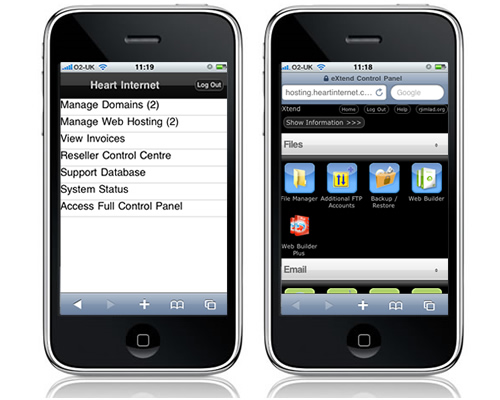
Resellers and your clients
If you are one of our resellers, as well as looking after your own hosting, you can also manage and add new hosting accounts in the Reseller Control Centre.
You can also give your own clients the ability to manage their web hosting accounts through their iPhone with direct access to eXtend. The brand name you have given the eXtend control panel in the eXtend Control Panel Configuration area of your RCC will appear in the top left of the control panel screen to ensure you maintain a coherent brand with your clients and Heart Internet is never exposed to them. All they have to do is go to the normal log in page on their iPhone and your branded ‘eXtend for iPhone’ will automatically be displayed. So if your customers normally login at www.extendcp.co.uk then they can just continue to do this and when they are in their iPhone we will automatically load the iPhone version of eXtend for them.
Give the new iPhone interface a try now by going to https://customer.heartinternet.uk/iphone


Awesome! I put this in a feature request a while back, not specifically iphone, just mobile access in general. But as I have an iphone now this is spot on for me. Well played.
Great idea, any idea when it will be out for Android?
I must reiterate Russell, when will this be available for android>
Great move making the RCC portable, being able to use this during a business meeting will be great USP.
This is a super cool new feature, well done HI! 😉
@Neil, Russell: Its something we are open to doing in the future if there is enough demand and based on feedback from this Beta stage of the iPhone CP
That’s great news. I guess that shows why we choose Heart; where else do you get that service.
Fantastic feature and another reason to trust my hosting to Heart – reliability AND innovation – well done to the team at Heart Internet
Awesome – have logged in to the full site before with my iPhone but this is so much easier. Can get to all my clients accounts now at anytime.
Great job guys!!!
Brilliant
Great service just got better
This is Awesome, makes life so much easier.
Wicked Job
Keep up the good work!
I’m really happy to see this, as are my customers. One question: is there a way to access the domain control panel in a mobile friendly version? managethisdomain.co.uk seems to use the standard layout when accessed from a mobile device.
Cheers
Matt Bearman
clearvector.net
Hey,
Only just had chance to see this in action, and it looks good so far. Love how you can add the link straight to the Home Screen, I had never realized you could do that.
Now a question how do you make a simple template for a website to run in iPhone mode, how does it recognize the browser. It would be cool if there was a quick tut how to make a simple homepage for the iPhone and add a Favicon to the homepage of the iPhone 🙂
Cheers
Chris
Can confirm it also works on the Sony Ericsson Satio.
Just a few aesthetic tweaks needed. Hint Hint
Great work “team Heart”
Regards – Gary M
WOuld be better if you could pay monthly for heart internet.
You can pay monthly on the Starter Pro, Business Pro and Reseller Pro accounts. Our resellers also get access to exclusive monthly contracts on dedicated servers.
We don’t seem to be able to login with the sub user accounts we have for our Reseller account.
Is this a known bug?
Hi Nick,
Please raise the issue with our support team and they will investigate for you 🙂
Jenni