



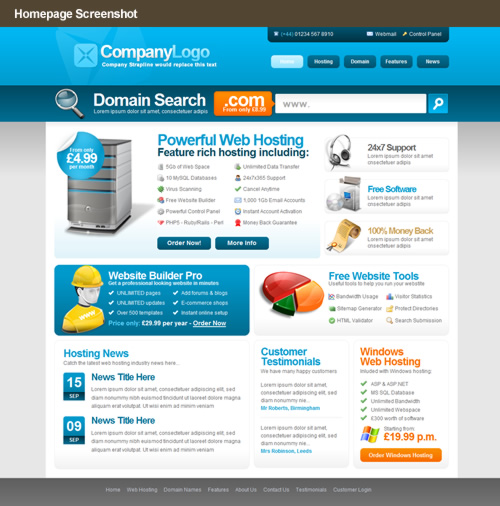
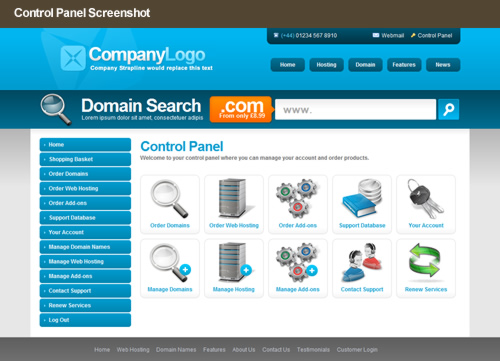
We have just released a brand new HostPay template which is now available to all our reseller hosting customers completely free of charge. No design skills? No problem, our latest template is our most modifiable to date, you can tailor the prices & features to your own HostPay setup without the need to touch a single graphic as all text is editable, none of which is image based. We wouldn’t want to make things more difficult for you now would we! 😉 – Stay tuned for green and red colour variations of this template which will be appearing in your HostPay control panel soon. As you would expect the template is fully standards compliant and passes the W3C validation test.
Heart Internet provides one of the most feature-rich reseller web hosting packages within the industry, our users can then pass on the same extensive set of tools and features to their own customers at no extra cost. We appreciate not all our customers are designers or have the time or money to spend creating a new template, which is why we provide a library of professional looking hosting templates that integrate with your HostPay installation completely free of charge. So not only are you able to resell a powerful and extensive set of tools and features you can also have a professional looking online presence as well (We just love to spoil you).
Take a peek at our latest HostPay design below, let us know what you think.
We hope you like it, feel free to leave any comments and show us examples of where you have used any of our new hosting templates.


Nice work Ben, I like this one a lot.
I really do like the reseller hosting templates. just finding it hard to setup right now. (templates keep over writing and waiting for support to get back to me about reinstalling hostpay)
Thanks very much for the comments, VERY pleased you like it!
Don’t forget to send us a link if you decide to use/modify the theme – we would love to see it in action!
@ David – thanks for your enthusiasm!! 😉
Just thought I’d give my praise for these new templates too. I like the design, the general look and feel, and I also like the fact it makes good use of CSS for the text. Not embedding all the text within images that need to be updated whenever something changes.
Nice work.
I’m slowly trying to crowbar the hostpay functionality, along with aspects of the template into my up and coming website (www.othernet.co.uk). Feel free to take a look and comment. It’s still in the development stage but I do have some clients I’m doing work for. So it must be doing something right 🙂
Well Ben, I guess it’s better late than never but I finally got your template up and running over the weekend. I was going to use the first template you did, but then had a look at the second and couldn’t make my mind up which to use. In the end I tried mixing the two to create my own with some success, but I did have trouble trying to make everything line up correctly so was a bit limited in what I could do. I thinkI need to hone my CSS skills a bit more as I haven’t really done much work with anything other than some basic css.
I didn’t really change anything in the customer centre area except to adjust some text size and line spacings as that looks great as it is.
I’m really chuffed now I have a decent looking site and hopefully it will do some of the selling for me. Hope you don’t mind but I sort of stole the template to use as a special site I have specifically for my customers to be able to access individual services without having to go through the Customer centre. You can see that at https://www.myloginpage.co.uk if you’re interested to see how your work is being used.
Thanks again Ben, you’ve done us a great service with those templates.
Hi Eddie,
Thanks very much for sharing your creation there, I can see how you’ve incorporated elements from both templates. Considering you have not had much CSS experience, I think you’ve done an outstanding job. Very nice work! :)- What elements can you not get aligned properly? Perhaps I could share a few pointers.
How did you find modifying the template, was there anything you felt could be improved?
All-in-all I think you’ve done a great job and wish you great success with your new venture! 🙂
Hi Ben,
Thanks for your comments, glad you like the work. Most of the problems I had was with the headers. I liked the header from the first template but preferred the body content of the second so I tried adding the first header to the second template but couldn’t quite get it to all line up properly without ending up with a horizontal scroll bar. In the end I took the content boxes from the first, added them to the second and then changed the footer over too as I preferred the darker blue colour. Most of the swapping about was done quite easily just by copying and pasting blocks of code from the ‘theme.css’ file of one template and adding it to the other, with minimal adjustment to some widths.
Modifying the template body and content was a real breeze which I found so much easier than those first templates, I really struggled with those and ended up using the blank template and building my own site around it in a bit of a hurry just to get Hostpay up and running on my account.
The thing I can think of to improve the templates is aimed at those of us who aren’t very good with graphics. I had a problem adding my own logo on the second template header simply because there seems to be a bit of a colour gradient there which wasn’t obvious looking at it on my screen, but it became very aparent after I created my own logo background to replace the demo one as it now looks like I just stuck a patch on there.
Another thing, which might not be doing any favours for anyone who wants to learn css, is to add commenting into the theme.css file to help indicate which parts of the template are affected by which parts of the css code. Personally I prefer experimenting to find out for myself, though it isn’t that difficult to work out from thetags in the template.
I think what would be very handy indeed would be to supply the templates with all their rhtml files included as downloadable zip files. The only other way to get them is to install a new template, but if you already have Hpay installed you have to empty the directory first to install a new one and then download all the files and then upload a backup of the original again. All a bit long winded. Incidentally, Notepad ++ which is available as a free download doesn’t have any problem opening rhtml files, and if like me, you simply paste a copy of the header and footer files into the ‘index.rhtml’ file, you can view the complete page in your browser from the Run menu in Notepadd ++ which really helps to see where you are with editing. Do that with any of the rhtml files, but don’t do what I did and forget to delete the header and footer parts again before uploading the new site to go live.
Anyway Ben, keep up your great work. It’s exactly this sort of thing that makes Heart Internet reseller package the only one worth its salt.
Best wishes
Eddie
Hi Ben,
I have just added the logo you modified to my site and it looks great. Such a big improvement to my original effort so a big thank you for doing that. Thanks for adding the tutorial which I seen at the beginning of the blog, I’m sure that’s going to help a lot of customers who like me, aren’t exactly the pablo piccasso’s with web graphics.
I’ll be looking forward to your tutorial walk through and from what I gather from reading one or two other blog comments, so will plenty of others too. You’ve given me enough assistance already Ben so I should step aside and allow others a look-in. Thanks so much for everything..
All the best
Eddie
Hi Eddie,
Thanks very much indeed, glad the logo worked out for you 🙂
Best of luck with everything.
Kind regards,
Ben
Too bad I cant swear here, cause I wanted to say its ******* great 😉
Hi Eddie,
Thanks for getting in touch so quickly! 🙂
I can certainly appreciate the struggles you are having with making the logo work with a gradient background. It just so happens i’ve created a tutorial on how to create your own gradient effect and the best way to export an image so it sits perfectly on top of a background with a gradient effect.
<h4>Tutorial link:</h4>
https://www.heartinternet.uk/blog/tutorial-creating-a-gradient-background-with-a-transparent-logo/
I’ve also taken the time to try the above method in the tutorial to make your logo transparent, please check your email shortly for the file and let me know how it looks as a replacement. 🙂
I’m actually going to be creating a video tutorial on how to style a HostPay template where I walk you through an existing design and change certain parts like text and colours. Stay tuned for that! 🙂
I could add extra commenting to the more tricky parts of the HostPay theme.css, I wouldn’t want to add it to every style as it would increase the file size, but i’ve taken your point regarding this on board and see what I can do. 🙂
Let me know if I can be of any more assistance.
Cheers,
Ben 🙂