

;)
;)
;)
;)
;)
;)

;)
;)
;)
When you set up Managed WordPress sites, you're given the option to use temporary domain names. This lets you view and work on your sites without changing your domain names' DNS settings. In other words, it lets you keep your existing site live while you work on a new one.
Temporary domain names are necessary because of the way WordPress itself handles its internal links and file structures — it uses absolute instead of relative paths. This means that instead of using links relative to the domain you're loading, which look like this:
<a href="/directory/file.extension" />link text</a>
...It uses absolute links that reference a specific domain name, which look like this:
<a href="http://domain.tld/directory/file.extension">link text</a>
When the domain name in the absolute link doesn't point to the account you want, it can't find the resources at the URLs it expects. So, when it tries to load files using the paths WordPress has created, which are absolute and use the domain name itself, it can't find them because the domain is pointed elsewhere. In essence, it breaks the site.
By using a temporary domain name, though, we provide a tool to build out or preview your sites without having to change their domain names' DNS settings. WordPress thinks the temporary domain name is the domain name we're going to use, so the absolute paths it creates are Web-accessible and load the appropriate resources to make the site work.
You'll know that they're using a temporary domain name because we leave a persistent message in the WP Admin panel notifying you:
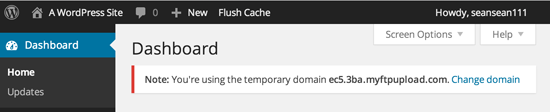
Once you're ready to move your DNS over, all you need to do is follow the Change domain link, and we'll take care of everything to make sure your sites work.
 Print Article
 Email Article to Friend
 Export to PDF