Add a bookable product
Create a Bookable product to allow your customers to purchase a booking through your store.
-
Click on WooCommerce > Products > Add New.
-
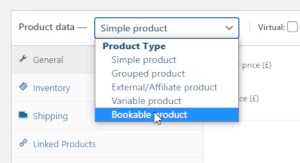
Under the "Product data" box, click on the dropdown and choose Bookable product.
-
Click on the Virtual checkbox if you're not going to ship this product to your customers. That's to make sure the "Shipping Costs" tab isn't enabled with your product.

-
Click on the Virtual checkbox if you're not going to ship this product to your customers. That's to make sure the "Shipping Costs" tab isn't enabled with your product.